> ## Documentation Index
> Fetch the complete documentation index at: https://sjaa-dev.mintlify.site/llms.txt
> Use this file to discover all available pages before exploring further.
# Database
> Schema and local database management
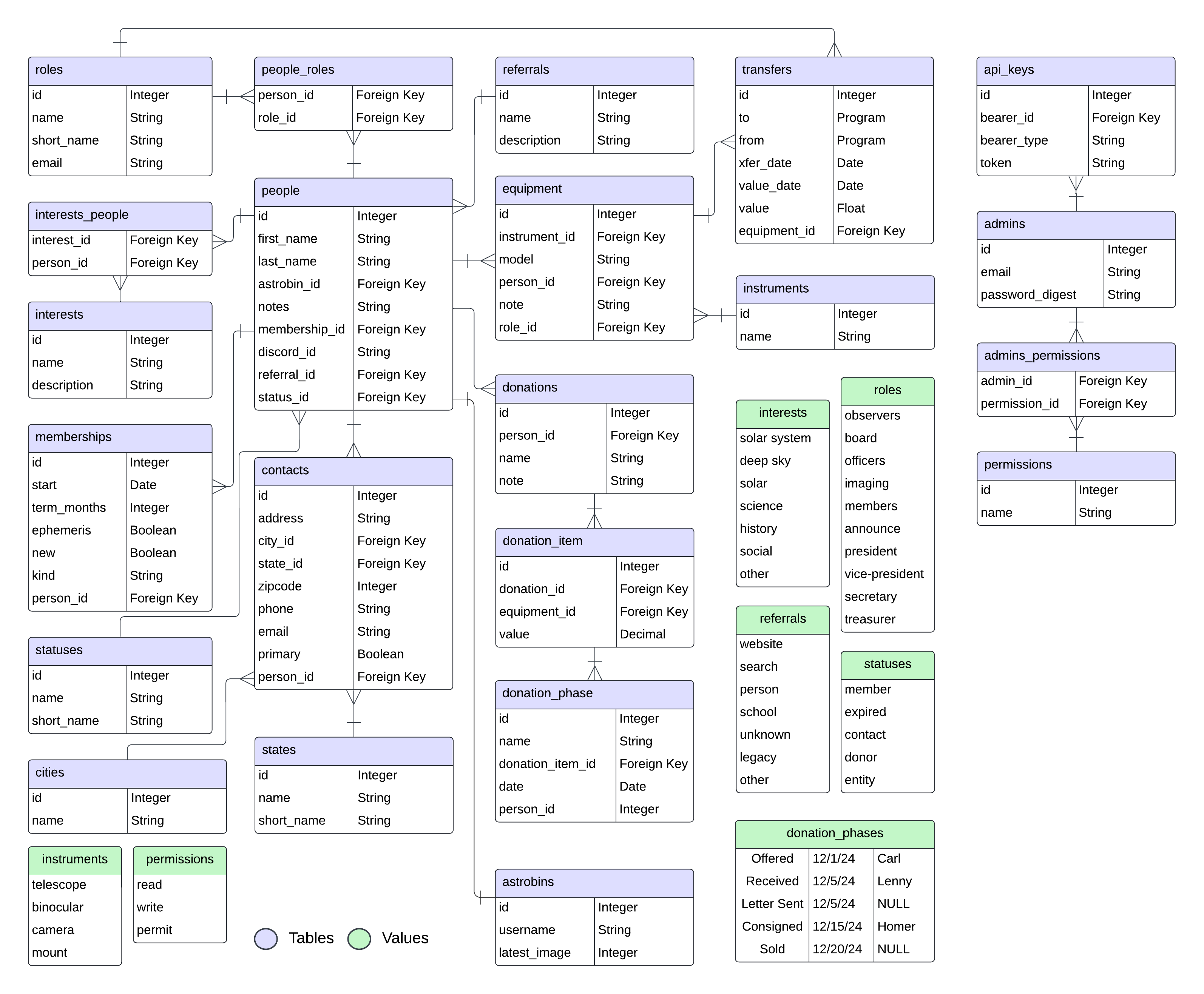
The development environment uses a Postgres database. This section describes the database schema and
how you can manipulate your local database for testing purposes.
## Schema
 ## Backup Database
In development, use the `pg_dump` utility to dump a copy of your database:
```sh theme={null}
pg_dump -U root -h localhost -d sjaa-db-dev -f `date -I`.sql
```
If you are running with the included Docker configurations, then get a shell in your `postgres_container`, create the backup file,
and copy it using `docker cp`.
```sh theme={null}
# Get a shell in your postgres container
docker container exec -it postgres_container bash
# Execute the backup in the container
pg_dump -U root -h localhost -d sjaa-db-dev -f `date -I`.sql
# Get a different local shell while still logged into your container
# Replace with the name of your backup file
docker cp postgres_container:/ .
```
## Restore from backup
```sh theme={null}
psql -h hostname -U root -d sjaa-db-dev < backup.sql
```
## Load data from SJAA DB
To load data from the Google Sheet formatted SJAA DB of yore, save the Google Sheet as a CSV, and then use the `patch` rake command:
```sh theme={null}
bin/rake patch PATCH_FILE=db.csv
```
## Backup Database
In development, use the `pg_dump` utility to dump a copy of your database:
```sh theme={null}
pg_dump -U root -h localhost -d sjaa-db-dev -f `date -I`.sql
```
If you are running with the included Docker configurations, then get a shell in your `postgres_container`, create the backup file,
and copy it using `docker cp`.
```sh theme={null}
# Get a shell in your postgres container
docker container exec -it postgres_container bash
# Execute the backup in the container
pg_dump -U root -h localhost -d sjaa-db-dev -f `date -I`.sql
# Get a different local shell while still logged into your container
# Replace with the name of your backup file
docker cp postgres_container:/ .
```
## Restore from backup
```sh theme={null}
psql -h hostname -U root -d sjaa-db-dev < backup.sql
```
## Load data from SJAA DB
To load data from the Google Sheet formatted SJAA DB of yore, save the Google Sheet as a CSV, and then use the `patch` rake command:
```sh theme={null}
bin/rake patch PATCH_FILE=db.csv
```